
Scroll Top
Light
Dark
Care
'%3e%3cpath%20d='M448.757%20949.23L905.532%20376.157C906.387%20375.084%20906.565%20373.622%20905.993%20372.376L809.1%20161.428C807.749%20158.488%20803.519%20158.647%20802.392%20161.68L699.575%20438.524C698.085%20442.537%20703.549%20445.375%20705.974%20441.848L812.448%20287.009L442.748%20945.186C440.56%20949.082%20445.971%20952.725%20448.757%20949.23Z'%20fill='%236C9BE8'/%3e%3cpath%20opacity='0.5'%20d='M763.667%20494.67L933.988%20280.172C937.169%20276.165%20937.64%20270.642%20935.182%20266.155L893.131%20189.392C888.855%20181.586%20878.089%20180.475%20872.309%20187.243L691.846%20398.557C681.734%20410.398%20697.681%20426.549%20709.65%20416.588L767.228%20368.672C777.63%20360.015%20792.559%20371.439%20786.922%20383.742L742.149%20481.466C735.892%20495.123%20754.326%20506.434%20763.667%20494.67Z'%20fill='%23BBD1F4'/%3e%3c/g%3e%3cdefs%3e%3cfilter%20id='filter0_f_1940_39862'%20x='282.928'%20y='-7.62939e-06'%20width='813.129'%20height='1109.95'%20filterUnits='userSpaceOnUse'%20color-interpolation-filters='sRGB'%3e%3cfeFlood%20flood-opacity='0'%20result='BackgroundImageFix'/%3e%3cfeBlend%20mode='normal'%20in='SourceGraphic'%20in2='BackgroundImageFix'%20result='shape'/%3e%3cfeGaussianBlur%20stdDeviation='79.6557'%20result='effect1_foregroundBlur_1940_39862'/%3e%3c/filter%3e%3c/defs%3e%3c/svg%3e)
How to pay?
Step-by-step guide to making an online payment
- Mobile Banking
- Online Banking
- Bank Transfer
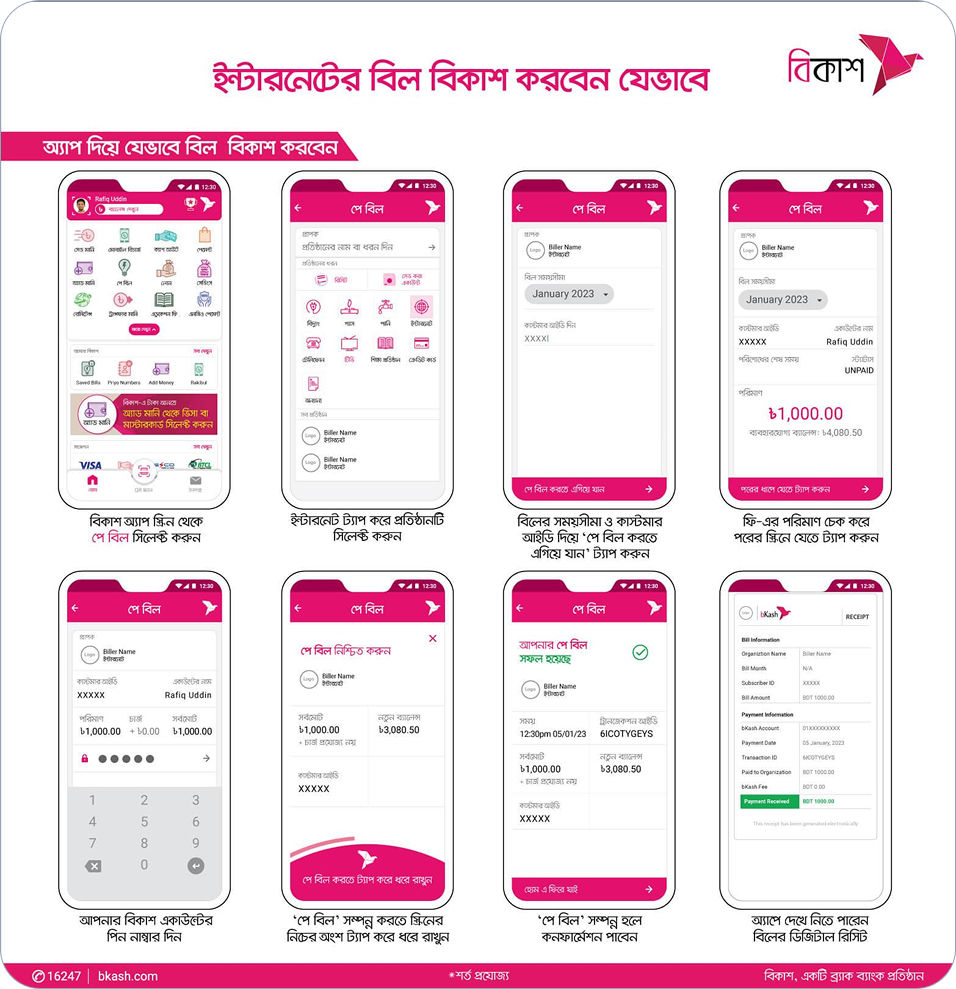
Pay bill with mobile banking
Bkash
Nagad
1.
Login to your bKash account with your account’s PIN number and tap on “Pay Bill” option.
2.
In “Pay Bill” option you’ll find “Salcync Online“. Simply tap on it and follow the next step.
3.
Now select your internet billing timeline in “Billing Cycle” box & input your customer in “Salcync ID” box.
4.
If you want to save the payment info for quick payment, you can simple tick the checkbox “Save this account for paying future bill”.
5.
After that, tap the “ Pay Bill Now” buttom & hold the pay button for a few second. You’re done!


Design amazing digital experiences that create more happy in the world.
Quick Link
Popular Packages
- Pack-3 (30 Mbps)
- Pack-4 (40 Mbps)
- Pack-5 (60 Mbps)
- Pack-6 (80 Mbps)
- Pack-7 (100 Mbps)
Company
- About us
- Term and condition
- Privacy and policy
© Copyright @ 2025 SaltSync. All Rights Reserved by LogicArray